It's that time of year when I really miss teaching - the start of the new school year where everything is fresh, exciting and new. There is so much hope for what lies ahead. I remember going in with all these great ideas and new things I was going to try and being filled with the thought that I was really going to be better this year and my students were going to have amazing experiences that would just spark their learning.
I miss that.
Some years it really did pan out the way I hoped. Most years, there were ups and downs. But - every year was a new challenge and every year I tried to do things differently. Granted, I was usually teaching the same subjects, but that didn't mean I had to do the same thing, did it? I certainly didn't believe so. Sure, I may have used some of the same projects or activities, but I had different students, I had learned some new things over the summer, and I didn't want to be bored repeating what I had done before.
The same old thing. Doesn't that just sound boring?
I know you teachers out there know some folks, if not yourself, who basically open up their file drawer and pull out the lesson plans from last year and just start all over again. Another year, just a repeat from last year. (Which I think explains some of the teacher burnout we might see or the stagnant student achievement). I personally, even in my current position, which is supporting teachers technology integration, don't do the same thing every year or even every day. Change is great and makes life more exciting, so why not embrace that in the classroom?
Here's my challenge to teachers. Try to change at least one thing you do in your classroom this year, change one thing about your instructional strategies, and change one thing in the resources you use. So - three things. Clearly, changing more is great, but very few people like change, so starting small is better. And these are not changes that might be hoisted upon you from the district or standards - those are often out of your control. The change I am talking about is a conscious effort to change yourself and your practice to create an engaging environment and help your students learn.
1) Changing one thing in your classroom. This might mean the way you arrange your desks, how you decide on and enforce the classroom rules, or where you put your desk. For example, if you are a by the row kind of teacher, try arranging the room in small groups instead. Classroom environment goes a long way in creating a place that is exciting to learn in.
2) Changing on thing about your instructional strategies. This might mean changing from lectures to inquiry once a week. It might mean focusing on improving your questioning skills so you are asking rather than telling. It might mean incorporating small group or pair collaboration. It might mean increasing your wait time. There are little things you can do that will make the learning in your classroom more engaging and provide an avenue for students to have a voice in their own learning.
3) Changing one thing about the resources you use. This can mean many things - for instance, trying to use hands-on manipulatives or using a visual demonstration of a concept rather than reading a definition. What I would really like to encourage is adding some type of technology into your resource choices, whether this means starting a class blog, or using some videos to spark learning or questions (great idea to launch lessons), or using the computers with some relevant software for what you teach. Introduce something that is going to spark the students interest (so not just a replacement for a drill-and-kill worksheet) and get them thinking in new and interesting ways. You want them involved in their learning, not passive receivers of information.
Not a lot to ask - change 3 things about yourself and what you do. I believe it will give you new hope and excitement about the coming school year. And it will definitely benefit your students - who wouldn't want to come to an open, inviting classroom where thoughts matter and learning is about exploring and engagement? School should be fun - for you and your students. Not the same old boring thing AGAIN.
Showing posts with label edtech. Show all posts
Showing posts with label edtech. Show all posts
Monday, August 20, 2012

Wednesday, July 11, 2012
Social Media's Impact on Personal Life - Personal Reflections
The question - does social media impact personal life? The answer - yes. Is that a good thing or a bad thing? The answer - it depends.
I have been on vacation the past week or so and am currently on personal leave to finish writing my dissertation proposal (which, as you can see, I am procrastinating!) During my vacation, I swore I would take a break from blogging, Twitter, email, and all things electronic.
I lied.
I admit - I did honestly make the attempt and in fact, did not turn on my computer one time. However, the iPad is a constant companion, especially since the books I am reading (currently, the Game of Thrones series) are on there, so I had the iPad with me a lot - even on the beach. It was very easy to check if I had emails, to check out my Facebook or to send a Twitter or two. Long story short, I failed miserably at the disconnecting aspect.
Which brings me back to the question of does social media impact personal life? The obvious answer in my case is a resounding yes. Is this impact good or bad? The answer to that: it depends. On vacation, while at the beach, sitting in my beach chair under the canopy, I took pictures with my iPad and posted them to Facebook. This was a good benefit to my personal life, as it kept a record of the vacation, captured moments that were happening right then and there, let friends and family see what was going on, and allowed all the friends we were vacationing with to have pictures they could tag and keep as memories.
However, while in same beach chair under same canopy, I also checked my email because, gosh darnit, I just can't help myself! This was a BAD impact on my personal life because clearly, I was NOT escaping my work and truly enjoying the vacation. Granted, I did mostly just read or delete the emails versus responding, but the fact that I was constantly connected to work is an aspect of social media that interferes with personal life. Obviously, I could turn off the email, but I don't, and I would imagine there are many others like me who can't turn off as well.
I also tweeted while on vacation. Not on a daily basis, but I definitely did tweet. I found this the second most difficult thing to avoid on vacation besides email. Those of you who tweet know that a daily presence is important, and so I felt as if I was missing out on things, which means this social media tool has a bad impact on my personal life - feeling guilty that I am not posting because a) I am missing information posted by those I follow and/or b) I might lose followers due to long-term silence in the twittersphere. I couldn't help myself - I did participate in the weekly #edchat on Tuesday. At the beach again, in my chair....but there it is - I was giving an entire hour of my vacation and time with friends to connect with my PLN. Bad impact or good impact on my personal life? A little of both I would think. Bad because I took that time away from the family and friends I was currently with, but good because I was connecting with people I 'know' virtually and sharing and getting ideas. (And - let's admit it - pretty cool that I could do it on the beach!!)
I did not blog - the one thing I managed to control. However - I felt extreme guilt that I was not blogging, since it's now been well over a week with no post. So - this is a bad impact of social media on personal life - the guilt. I don't know about those of you who blog or tweet or Facebook, but I personally feel a constant sense of guilt if I am NOT posting regularly. And the funny thing is, I don't really know that anyone besides me cares that I don't post - heck, I don't even know if there are people out there reading what I write or are interested in what I have to say, but I feel a sense of responsibility to post, and when I don't, I feel guilty. The fact that every day I think about what I could post to Twitter or Linked In, and that I am constantly, in every aspect of what I do, thinking about whether it would make an interesting blog post or tweet, means that social media is impacting my personal life on a daily basis.
My conclusion - social media definitely impacts personal life. How much is up to the individual person. And whether it's a good impact or bad impact depends on the situation, the time, and the reason. Social media and the folks you connect with via social media channels do become part of your personal life, so it's a matter of balancing the live experiences with the virtual experiences and knowing when to disconnect. Balance is the key and clearly I need to work on my balancing act!
I have been on vacation the past week or so and am currently on personal leave to finish writing my dissertation proposal (which, as you can see, I am procrastinating!) During my vacation, I swore I would take a break from blogging, Twitter, email, and all things electronic.
I lied.
I admit - I did honestly make the attempt and in fact, did not turn on my computer one time. However, the iPad is a constant companion, especially since the books I am reading (currently, the Game of Thrones series) are on there, so I had the iPad with me a lot - even on the beach. It was very easy to check if I had emails, to check out my Facebook or to send a Twitter or two. Long story short, I failed miserably at the disconnecting aspect.
 |
| View from chair and under canopy! |
However, while in same beach chair under same canopy, I also checked my email because, gosh darnit, I just can't help myself! This was a BAD impact on my personal life because clearly, I was NOT escaping my work and truly enjoying the vacation. Granted, I did mostly just read or delete the emails versus responding, but the fact that I was constantly connected to work is an aspect of social media that interferes with personal life. Obviously, I could turn off the email, but I don't, and I would imagine there are many others like me who can't turn off as well.
I also tweeted while on vacation. Not on a daily basis, but I definitely did tweet. I found this the second most difficult thing to avoid on vacation besides email. Those of you who tweet know that a daily presence is important, and so I felt as if I was missing out on things, which means this social media tool has a bad impact on my personal life - feeling guilty that I am not posting because a) I am missing information posted by those I follow and/or b) I might lose followers due to long-term silence in the twittersphere. I couldn't help myself - I did participate in the weekly #edchat on Tuesday. At the beach again, in my chair....but there it is - I was giving an entire hour of my vacation and time with friends to connect with my PLN. Bad impact or good impact on my personal life? A little of both I would think. Bad because I took that time away from the family and friends I was currently with, but good because I was connecting with people I 'know' virtually and sharing and getting ideas. (And - let's admit it - pretty cool that I could do it on the beach!!)

 |
| Canopy Life at the beach w/iPad |
My conclusion - social media definitely impacts personal life. How much is up to the individual person. And whether it's a good impact or bad impact depends on the situation, the time, and the reason. Social media and the folks you connect with via social media channels do become part of your personal life, so it's a matter of balancing the live experiences with the virtual experiences and knowing when to disconnect. Balance is the key and clearly I need to work on my balancing act!
Thursday, June 28, 2012
ISTE 2012 Impressions
As I wrote in my post last week, I was heading to ISTE 2012 in San Diego. I wrote about several things the conference had to offer that I wanted to explore, so I thought this would be a good time to provide some feedback since the conference is now over.
First, I was so impressed with the technology, which of course one would expect at a technology conference. But, the fact that throughout the entire conference free wifi was available was really a bonus and something that other conferences really need to consider. It allows for participants to stay connected. All the tweets and blogs that occurred throughout the day provided additional support and exposure of the conference,which I think might outweigh cost.
Second, I really felt the structure of the conference fostered collaboration and gave everyone time to see exhibits and learn without feeling torn. I know at the math conferences there are so many presentations scheduled at every time, with no breaks, so as a participant you have to choose either exhibits or presentations. At ISTE there were specific times when no sessions were offered, with the idea that participants could then go to exhibits or hang out and network or blog or meet folks in the lounges, or check out a playground. It was great not to have to decide one or the other. I was able to go to several terrific sessions, roam the exhibit hall, and manage a couple lounge visits.
Third, it was very apparent that this conference is about networking, collaboration and using technology to connect and enhance education. This was evident in the lounges, where people were blogging and chatting, or in the Social Media Lounge tweeting away but connecting face to face with online colleagues. The live #edchat in the Newbie Lounge on Tuesday afternoon was a personal highlight for me, as I was able to meet personally with folks I tweet with regularly. The atmosphere of the whole conference was about support, connecting, sharing and supporting each other. It was a very positive vibe.
Overall, I completely enjoyed myself at this conference. Of course, the gorgeous weather in San Diego didn't hurt! I hope that one day the math conferences will embrace some of the structures and focus of ISTE...think it goes a long way towards a great learning experience. See you next year!
First, I was so impressed with the technology, which of course one would expect at a technology conference. But, the fact that throughout the entire conference free wifi was available was really a bonus and something that other conferences really need to consider. It allows for participants to stay connected. All the tweets and blogs that occurred throughout the day provided additional support and exposure of the conference,which I think might outweigh cost.
Second, I really felt the structure of the conference fostered collaboration and gave everyone time to see exhibits and learn without feeling torn. I know at the math conferences there are so many presentations scheduled at every time, with no breaks, so as a participant you have to choose either exhibits or presentations. At ISTE there were specific times when no sessions were offered, with the idea that participants could then go to exhibits or hang out and network or blog or meet folks in the lounges, or check out a playground. It was great not to have to decide one or the other. I was able to go to several terrific sessions, roam the exhibit hall, and manage a couple lounge visits.
Third, it was very apparent that this conference is about networking, collaboration and using technology to connect and enhance education. This was evident in the lounges, where people were blogging and chatting, or in the Social Media Lounge tweeting away but connecting face to face with online colleagues. The live #edchat in the Newbie Lounge on Tuesday afternoon was a personal highlight for me, as I was able to meet personally with folks I tweet with regularly. The atmosphere of the whole conference was about support, connecting, sharing and supporting each other. It was a very positive vibe.
Overall, I completely enjoyed myself at this conference. Of course, the gorgeous weather in San Diego didn't hurt! I hope that one day the math conferences will embrace some of the structures and focus of ISTE...think it goes a long way towards a great learning experience. See you next year!
Thursday, June 21, 2012
ISTE 2012 - Conference Kudos
 I am going to the ISTE 2012 Conference in San Diego this coming weekend/week. That in itself is pretty exciting. It's my first time at ISTE, not for lack of wanting, more for lack of timing and cost. I am very excited knowing I am going to be immersed in technology, meeting other ed-tech enthusiasts, and just learning more about what's out there that can help me personally and professionally. Another reason I am excited is that I will experience a conference that has some very different options from the math conferences I usually attend.
I am not knocking math conferences. Rather, what I am pointing out are the many ways in which the ISTE conference differs in what it provides in the way of collaboration, networking and technology that is unfortunately, not often a part of math conferences. This may be true of other content specific conferences, but since I am most familiar with math conferences, that is my point of reference. I am sure a lot of it has to do with the fact that edtech enthusiasts tend to be more connected because of technology, so it's really great to see that the conference itself supports that in so many ways.
One thing that stands out in particular are ISTE's Networking Lounges. These are places for like-minded attendees to meet and greet and connect with others. Places to hang out, recharge devices - what a great idea! Instead of what I am use to, where you see folks wandering conference halls aimlessly looking for an outlet or a place to rest. These lounges are specifically themed so you can head to the lounge of most interest to you where you can connect with others, perhaps even those you have only met via Twitter or LinkedIn or Facebook. I myself am thinking the Bloggers Cafe or the Newbie Lounge or the Social Butterfly Lounge all sound like fun places to stop in and see what's going on. This type of free, available space where you can arrange to meet with others or just run in and meet the folks who are hanging out allows for some powerful networking.
Participating remotely I know has become a feature of many conferences, and even the math conferences have some events (usually just the main Keynotes and awards presentations) available virtually, but ISTE has some actual workshops as well as Keynote sessions available remotely. This is a great option for folks unable to attend live. Using ISTE's Remote Program you could spend a virtual day at the conference - pretty awesome.
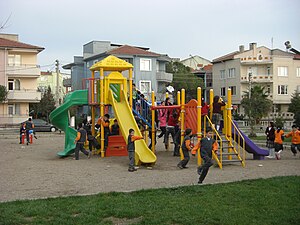 What kid doesn't love a playground, and apparently adults are the same! ISTE provides Focus Playgrounds, where you can attend a single or all-day event and play around with interactive technologies. One of my tweeps pointed this out to me the other day (@gridjumper), specifically the SIGVE Playground, so definitely going to play there. There are several others that look interesting to me, such as the STEM & Computer Science Playground, or the Mobile Learning Playground. I guess this is like recess!
There are some Social Events as well, where you can meet with folks you connect with virtually (the Tweetup Meetup) or Global Happy Hour to again, meet up with folks. And, you can also see all the sponsor events in one location through the Sponsor Activities, which is terrific, especially if you are interested in those specific companies and their products. Makes life easy.
I am still discovering more as I explore the ISTE Conference site. There's the Blog Roll where you can follow others blogging about ISTE or the ISTE Communities, that allow you to follow conference news and updates and connect with Twitter, Facebook, LinkedIn. This is definitely a networking, collaboration conference! It was suggested to me from one of my tweeps (@erinKohl) to use the conference planner and focus myself, so I plan on doing that. Though I just found there is a mobile app for the conference guide as well, so might have to do that on the iPad! And - WiFi is available throughout the conference hall and meeting rooms, though not in the exhibit halls. Gotta love a tech conference! Feeling like a kid in a candy store.
Really looking forward to the whole experience and hopefully it will be the first of many ISTE conferences. Hoping to meet many of my virtual colleagues and friends (#edchat meetup and live #edchat in particular) while there. If you are going, maybe I will run into you on the playground!
Wednesday, May 23, 2012
Dynamic Geometry® - A Solution to Math Boredom
I have been writing a piece about dynamic geometry® software, and have had a really difficult time conveying the power of dynamic mathematics environments in the static environment of the written word.
Let me clarify what I mean by dynamic geometry software - I do NOT mean software that is just for geometry. Dynamic geometry means the ability to take all sorts of mathematics visualizations (shapes, graphs, plots, functions) and drag and manipulate them to create infinite examples. These dynamic movements follow mathematical behaviors and allows for exploration, discovery of relationships and properties and allow students to interact directly with the mathematics because the mathematics is visual and tangible. Dynamic geometry software is specifically mentioned in the Common Core Standards of Mathematical Practice because of it's ability to be a tool that promotes reasoning, questioning, making conjectures, persevering, modeling, and communicating. Naturally, I have a strong bias towards specific dynamic geometry software: Sketchpad, Tinkerplots and Fathom.
Knowing that dynamic geometry software is all about movement, as I try to write about it for this piece I am doing, I realize it is almost impossible to convey the power of dynamic geometry with words or even with pictures. I have been describing what students would be doing with the software and then supporting this description with a picture that steps through the process, but what I find is they are just pictures taken at one point in time. And while the pictures show a progression of change, they do not capture, just as the words do not capture, the amazing change in the mathematics, the sense of wonderment, and the 'aha' moment that a student might encounter when working in a dynamic environment.
In a word - they are boring.
Which is probably why students who are exposed to only textbooks with words and pictures of math never get the sense of power, wonder and infinite possibilities of mathematics. Even students who are using technology (calculators or computers or apps) but only doing drill-and-practice type applications or calculations with these tools, are not getting the sense of movement, connectedness and variation that dynamic geometry software provides.
Here is an example of what I mean by boring and static:
What?!!!
That's what I think a student might say if they read something like that in a textbook. But - never fear - there are pictures that show what is happening:
 Are you getting the sense of movement? Do these pictures convey the relationships that exist between the variables? Do they convey the relationship between the data, attributes and graphs?
Now, look at the exact same problem done in the dynamic environment where you can actually do what was described and see the data change as you explore and manipulate:
I think my point is dynamic geometry software is a technology tool that makes mathematics come alive for students rather than be a static subject they read about, look at, but never interact with in a way that helps them see and make connections. My hope is that etextbooks and online assessments and other technology resources that will become more commonplace in this ed tech focused environment will consider doing things dynamically, rather than simply replicating the static words and images that currently exist. Giving students the ability to create, explore, change and manipulate on their own is powerful and exciting. It makes math engaging rather than boring, expanding rather than limiting.
Let me clarify what I mean by dynamic geometry software - I do NOT mean software that is just for geometry. Dynamic geometry means the ability to take all sorts of mathematics visualizations (shapes, graphs, plots, functions) and drag and manipulate them to create infinite examples. These dynamic movements follow mathematical behaviors and allows for exploration, discovery of relationships and properties and allow students to interact directly with the mathematics because the mathematics is visual and tangible. Dynamic geometry software is specifically mentioned in the Common Core Standards of Mathematical Practice because of it's ability to be a tool that promotes reasoning, questioning, making conjectures, persevering, modeling, and communicating. Naturally, I have a strong bias towards specific dynamic geometry software: Sketchpad, Tinkerplots and Fathom.
Knowing that dynamic geometry software is all about movement, as I try to write about it for this piece I am doing, I realize it is almost impossible to convey the power of dynamic geometry with words or even with pictures. I have been describing what students would be doing with the software and then supporting this description with a picture that steps through the process, but what I find is they are just pictures taken at one point in time. And while the pictures show a progression of change, they do not capture, just as the words do not capture, the amazing change in the mathematics, the sense of wonderment, and the 'aha' moment that a student might encounter when working in a dynamic environment.
In a word - they are boring.
Which is probably why students who are exposed to only textbooks with words and pictures of math never get the sense of power, wonder and infinite possibilities of mathematics. Even students who are using technology (calculators or computers or apps) but only doing drill-and-practice type applications or calculations with these tools, are not getting the sense of movement, connectedness and variation that dynamic geometry software provides.
Here is an example of what I mean by boring and static:
Using TinkerPlots®, it's possible to explore relationships between attributes (i.e. variables) from data on which students have the heaviest backpacks. Grab an attribute from the card stack of data, say body weight, drag and drop it onto the horizontal axis of the plot, then grab a second attribute that might have a relationship, like pack weight, and drag and drop it on the vertical axis. Separate the data both vertically and horizontally to get a scatter plot, and determine if indeed there is a relationship. In this case, there is a positive correlation between body weight and pack weight. Add a moveable line and create a line of best fit, which shows the equation of the line using the attributes from the problem, making the function fit the context of the situation.
What?!!!
That's what I think a student might say if they read something like that in a textbook. But - never fear - there are pictures that show what is happening:

Now, look at the exact same problem done in the dynamic environment where you can actually do what was described and see the data change as you explore and manipulate:
I think my point is dynamic geometry software is a technology tool that makes mathematics come alive for students rather than be a static subject they read about, look at, but never interact with in a way that helps them see and make connections. My hope is that etextbooks and online assessments and other technology resources that will become more commonplace in this ed tech focused environment will consider doing things dynamically, rather than simply replicating the static words and images that currently exist. Giving students the ability to create, explore, change and manipulate on their own is powerful and exciting. It makes math engaging rather than boring, expanding rather than limiting.
Sunday, May 6, 2012
Planning for Hybrid PD (part 6) - Sharing and Collaboration
I am preparing for my final face-to-face meeting with the two cohorts of middle and high school math teachers I have been working with the past 6 months. We will still have one more online component, which ends in June.
I am a little sad about the fact that our journey is coming to an end, as it has been one of my most rewarding professional development experiences, in large part because I was able to really get to know these teachers both personally and professionally and actually see the progression of change and confidence as they learned and integrated Sketchpad into their mathematics instruction.
A quick recap of the five previous face-to-face lessons, or focus you might say:
 This face-to-face each participant will actually be sharing a Sketchpad lesson they did with their students, focusing on why they picked the lesson, how it addressed both their curriculum and Common Core State Standards (a focus of our hybrid PD), and what they might have done to modify or enhance the lesson to address their students needs. Each person has 10-15 minutes to basically show us what they have learned about both Sketchpad and integrating technology. As you can imagine, there is quite a bit of nervousness around this, which I have sensed in the online discussion forums. I find this both humorous and sad. The fact that teachers who face a roomful of middle school and high school students on a daily basis for hours each day are scared and nervous about presenting a 10-15 minute demo for their peers is really funny and unbelievable. But, it's sad that teachers do not feel comfortable to share their teaching expertise with colleagues who will not only learn from it but will also share their own expertise. Perhaps that is a sign of what we don't do right in the teacher profession - share and collaborate as a regular component of continued learning and improvement.
Which brings me to my sixth and final lesson, or focus, for face-to-face professional development:
My hope is that these presentations, hard as they may be for a few of the participants, will open the door to the next phase for each of them to become a model of technology integration in their own schools.
For the complete Hybrid PD series, click on the links below:
Planning for Hybrid PD - Comfort Level and Confidence First
Follow-up On Planning for Hybrid PD - Day 1
Follow-up On Planning for Hybrid PD - Day 2
Hybrid PD - Online Community Development Pt 1
Planning for Hybrid PD (part 2) - Develop Community and Supportive Environment
Follow-up On Planning for Hybrid PD (Part 2) - F2F Feedback
Hybrid PD - Online Community Development Pt. 2
Planning for Hybrid PD (part 3) - Make it Relevant
Follow-up On Planning for Hybrid PD (part 3) - F2F feedback
Hybrid PD - Online Community Development Pt. 3
Planning for Hybrid PD (part 4) - Teacher Input
Follow-up On Planning for Hybrid PD (part 4) - F2F Feedback
Hybrid PD - Online Community Development Pt. 4 - Student Focused!
Planning for Hybrid PD (part 5) - Make the PD Learning Their Own
Follow-up for Hybrid PD (part 5) - F2F Feedback
I am a little sad about the fact that our journey is coming to an end, as it has been one of my most rewarding professional development experiences, in large part because I was able to really get to know these teachers both personally and professionally and actually see the progression of change and confidence as they learned and integrated Sketchpad into their mathematics instruction.
A quick recap of the five previous face-to-face lessons, or focus you might say:
Lesson One: Begin professional development experiences assessing background skills of participants.
Lesson Two: Work on building a sense of community and support among participants, where they feel comfortable sharing their struggles, their experiences, their ideas and expertise.
Lesson Three: Make the activities and learning relevant to the teachers every-day teaching practice.
Lesson Four: Provide teachers with a choice in what the professional development focuses on.
Lesson Five: Provide suggestions and examples of taking the activities/content of the professional development and modifying (adding to, deleting from, etc.) to meet the diverse needs of their students.

Which brings me to my sixth and final lesson, or focus, for face-to-face professional development:
Lesson Six: Provide the opportunity for sharing, presentation and peer feedback to model the professionalism, collaboration, and support that will be needed to sustain use of PD learning.Not enough time or opportunity is given to teachers to model for each other and to share and explore new strategies and skills in a collaborative, supportive environment, and it is so crucial to improving practice. Just as our students learn from their peers, so do teachers, and it is important to be able to share and present and get feedback from others in order to make improvements or consider alternatives.
My hope is that these presentations, hard as they may be for a few of the participants, will open the door to the next phase for each of them to become a model of technology integration in their own schools.
For the complete Hybrid PD series, click on the links below:
Planning for Hybrid PD - Comfort Level and Confidence First
Follow-up On Planning for Hybrid PD - Day 1
Follow-up On Planning for Hybrid PD - Day 2
Hybrid PD - Online Community Development Pt 1
Planning for Hybrid PD (part 2) - Develop Community and Supportive Environment
Follow-up On Planning for Hybrid PD (Part 2) - F2F Feedback
Hybrid PD - Online Community Development Pt. 2
Planning for Hybrid PD (part 3) - Make it Relevant
Follow-up On Planning for Hybrid PD (part 3) - F2F feedback
Hybrid PD - Online Community Development Pt. 3
Planning for Hybrid PD (part 4) - Teacher Input
Follow-up On Planning for Hybrid PD (part 4) - F2F Feedback
Hybrid PD - Online Community Development Pt. 4 - Student Focused!
Planning for Hybrid PD (part 5) - Make the PD Learning Their Own
Follow-up for Hybrid PD (part 5) - F2F Feedback
Friday, April 13, 2012
Math Manipulatives: From Physical to Virtual
I have been thinking and planning for my upcoming NCTM presentation on taking the hands-on, physical math manipulatives we use to help students learn and model mathematics to the virtual realm in order to provide unlimited capabilities to explore and understand. It's something that I think is often thought of as an either or - either teachers use hands-on, physical models or they use virtual models, such as The Geometer's Sketchpad, and my thoughts are we should be using both. It's a way to help students see and understand the power of technology by exposing them to the limitations of the physical and then providing them the opportunity to see the capabilities to go beyond with technology.
Some simple examples of what I mean:
 1) Geoboards - students begin to explore polygons with geoboards, but are limited by the number of pegs on the geoboard, the number of rubber bands and the physical limitations of both (you can only stretch a rubber band so far before it snaps and hits you in the eye!). On a virtual geoboard, which is very easy to create in Sketchpad using a grid and snap points, you can use the polygon tool to create infinite polygons of many sides and shapes. You can measure sides, angles, area, perimeter. Students can explore and question and test to their hearts content and no students get injured in the process! There are no physical limitations to hinder discovery and understanding.
2) Algebra Tiles - a great way to introduce students to multiplying and factoring polynomials is with algebra tiles. But again, eventually you are limited by the physical constraints of the tiles - you can only work with fairly simple polynomials due to the number of tiles you have available. Using Sketchpad, you can create infinite examples and explore many possibilities and test conjectures - there are no limits and students still get the hands-on manipulation, but can go even further by then graphing and looking at the equations, so that they see all the connections. It becomes a multiple representational cornucopia.
As people consider technology and appropriate technology for classroom, look for technology that doesn't just replicate what is done in the class, but rather allows for exploration and discovery beyond what the physical models allow and leads to deeper understanding and a greater appreciation for the beauty and power of mathematics.
To end, just a quick how-to construct perpendiculars using The Geometer's Sketchpad. Unlimited possibilities.
Some simple examples of what I mean:

2) Algebra Tiles - a great way to introduce students to multiplying and factoring polynomials is with algebra tiles. But again, eventually you are limited by the physical constraints of the tiles - you can only work with fairly simple polynomials due to the number of tiles you have available. Using Sketchpad, you can create infinite examples and explore many possibilities and test conjectures - there are no limits and students still get the hands-on manipulation, but can go even further by then graphing and looking at the equations, so that they see all the connections. It becomes a multiple representational cornucopia.
As people consider technology and appropriate technology for classroom, look for technology that doesn't just replicate what is done in the class, but rather allows for exploration and discovery beyond what the physical models allow and leads to deeper understanding and a greater appreciation for the beauty and power of mathematics.
To end, just a quick how-to construct perpendiculars using The Geometer's Sketchpad. Unlimited possibilities.
Sunday, December 11, 2011
Planning for Hybrid PD - Comfort Level and Confidence First
I am going to spend a couple days with teachers this week introducing them to Sketchpad, Sketchpad LessonLink and online learning. We are starting a 7-month long hybrid professional development experience designed to provide long-term, sustained learning for integrating technology into math instruction. This means once-a-month get togethers to collaborate and share the experiences and student artifacts of what happened in the classroom as they implement lessons, and then month-long online components designed to continue the collaboration and learning of both the software and instructional strategies. I am excited about starting this, and find myself going over and over all the things I know are needed. The research I have been immersed in lately, as well as my own personal experiences providing professional development for teacher over the past 18 years, has given me much food for thought and experiences I think will go a long way in helping me provide an experience that will support these teachers as they begin their journey of implementing Sketchpad into their instruction.
 For our kick-off meetings this week, I want to really focus on helping these teachers feel comfortable in the learning environment we are about to start. I think that is the most important thing as we begin our journey. There are time constraints that don't make the first face-to-face ideal, so how do I work around that and make sure everyone leaves with the confidence they need to start their first month of online learning? They are new to everything - not only the software, but the online learning environment, so the focus in our first face-to-face is to really make sure they feel comfortable with how to get in the online course, access the online resources, and know how to start with the software. Quite a bit to accomplish in a three hour meeting! But...if they can leave feeling that they know how to begin, where to get the resources and access everything, then I think we can spend our first month actually learning. If they leave feeling overwhelmed by the technology and access components, the learning of the software and strategies will become secondary or frustrating.
Lesson One: Begin a professional development experience assessing the background skills of participants.Ensure they are given the necessary tools, starting points, and resources to feel comfortable with what they are going to be doing, see the purpose behind what they will be doing, and know where and how they can get continued support.

Lesson One: Begin a professional development experience assessing the background skills of participants.Ensure they are given the necessary tools, starting points, and resources to feel comfortable with what they are going to be doing, see the purpose behind what they will be doing, and know where and how they can get continued support.
Subscribe to:
Posts (Atom)